Metronome for music practice
The DrillTime metronome is a steady, sample-accurate click for practising any instrument. It is made for music students and the teachers who set their practice, with time signatures, accents, swing and a range of click sounds, in English or Arabic.
Who it helps
In my lessons, most timing problems come back to one thing: the pulse drifts and the student does not notice. A metronome makes that drift easy to hear. It helps:
- Beginners who rush the easy bars and slow down in the hard ones.
- Students preparing a piece for a lesson, a concert or an exam.
- Teachers who want every student to practise at a set tempo between lessons.
- Bilingual classrooms, because every screen works in English and Arabic.
How to use it
Choose a tempo and a time signature, then start the click and practise along with it. Begin slowly, and only raise the tempo when the passage feels easy.
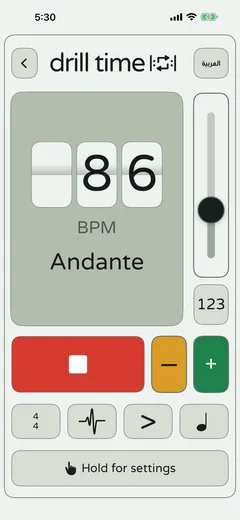
- Set the tempo with the slider or the plus and minus buttons. The screen shows the BPM and its Italian tempo name, such as Andante or Allegro.
- Pick the time signature, and use accents to mark the strong beats of the bar.
- Add swing if the style needs it, and choose the click sound you hear best over your instrument.
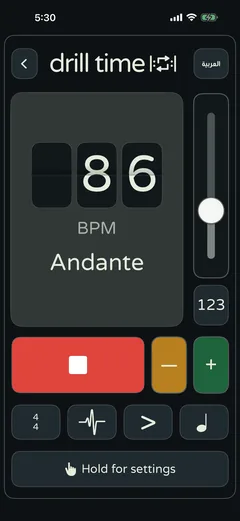
- Hold the settings button for a light or dark theme, sound or flash output, a count-in, and your default tempo and click sound.
Practice tips from a teacher
Musicians have long practised with a metronome to keep a steady tempo (opens in a new tab), the speed of the music. These are the habits I teach with it:
- Start slower than you think. If you cannot get a passage right three times in a row, the tempo is too high.
- Listen for the click disappearing. When you are exactly together with it, the click almost vanishes under your note.
- Count out loud for the first few bars, especially after a rest.
- Keep sessions short and focused. Ten good minutes beat an hour of drifting.
- Turn the click off for the last run-through and check that the tempo holds on its own.
A simple daily routine
| Stage | What to do | Suggested time |
|---|---|---|
| Warm-up | Long notes or open strings with the click at a slow, comfortable tempo | 3 minutes |
| Technique | Scales or exercises, two notes per click, then four | 5 minutes |
| Piece, slowly | The hardest bars of your piece at a tempo you can perform cleanly | 7 minutes |
| Piece, faster | Raise the tempo a little and repeat the whole section | 3 minutes |
| Without the click | One run-through on your own to check the pulse holds | 2 minutes |
Key terms
- Metronome
- A device or app that sounds a steady click at a tempo you choose, so you can keep an even pulse.
- BPM
- Beats per minute. At 60 BPM there is one beat every second; at 120 BPM there are two.
- Tempo
- The speed of the music, given in BPM or with an Italian word such as Andante (at a walking pace) or Allegro (cheerful and fairly fast).
- Subdivision
- Splitting each beat into smaller equal parts, such as two quavers or four semiquavers, to keep faster notes even.
Questions
Can I use the DrillTime metronome with any instrument?
Yes. It is a steady click, so it works for guitar, piano, strings, wind, drums or voice. Choose the click sound that cuts through best over your instrument.
Does the metronome work without an internet connection?
Yes. DrillTime works fully offline and needs no account, so it is ready in a practice room, a classroom or on a shared iPad.
What tempo should I start at?
Start at a tempo where you can perform the passage cleanly three times in a row. For many students that is well below the marked tempo, and that is fine.
Practise with DrillTime
 Coming soon on theقريباً علىApp Store
One-time purchase. No subscription, no ads, no accounts.