DrillTime for teachers and schools
DrillTime is a music practice app for iPhone and iPad with a metronome, a tempo trainer and a rhythm-reading trainer, made for young musicians and the teachers who set their practice. It is safe for students by design: there are no accounts, no ads and no in-app purchases, and it collects no personal data. Everything works offline, in English or Arabic.
I teach guitar in Dubai, and the hardest part of my job is not the lesson itself; it is what happens in the six days in between. I built DrillTime to give students something focused to do in those days, and to give teachers like you a simple way to set it.
How teachers use DrillTime
Metronome: a tempo target for the week
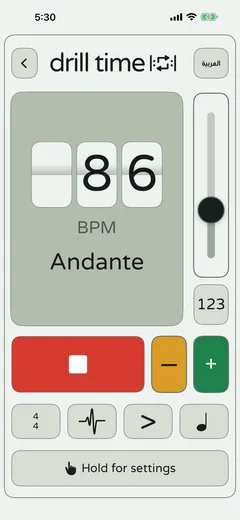
Give each student a passage and a BPM to reach, and ask them to practise along with the metronome. The screen shows the BPM and its Italian tempo name, and students choose the time signature, accents, swing and click sound, so it suits most styles and instruments.
Speed Builder: build a tricky passage up gradually
For a passage that falls apart at full speed, set a start tempo and a goal tempo in Speed Builder. It raises the tempo in small steps and shows the current tempo, the step and the time left, so students practise the climb instead of forcing it.
Rhythm Shuffler: rhythm reading between lessons
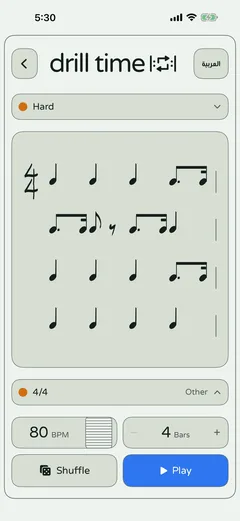
Rhythm Shuffler shows a fresh written rhythm, the student taps it back, and it shows their accuracy as a percentage and how many notes were on the beat, early, late or missed. With six difficulty settings it works for beginners and confident readers alike, and the rhythms change every time.
| Goal | Tool | How to use it in a week |
|---|---|---|
| A steady pulse | Metronome | Practise the week’s passage with the click at a set tempo, then once without it |
| Reaching the marked tempo | Speed Builder | A start tempo the student can manage and the marked tempo as the goal, in a few short sessions |
| Reading rhythms with confidence | Rhythm Shuffler | A few fresh rhythms a day at a comfortable difficulty, checking the accuracy each time |
| A daily routine | All three | A short daily session: a metronome warm-up, one Speed Builder passage, then two or three rhythms |
Safe for students
Teachers are rightly careful about which apps they recommend to children, so here are the facts from our privacy policy and terms:
- No accounts: there is no sign-up and no login.
- No ads and no in-app purchases.
- No personal data collected, and no analytics or tracking.
- Works fully offline, with no network requests during practice.
- Suited to shared classroom devices, because nothing personal is stored.
The full privacy policy explains why DrillTime meets COPPA, GDPR-K and school data-protection requirements by design, including for children under 13.
Made for English and Arabic classrooms
DrillTime is fully bilingual. Every screen works in English and in Arabic, with a complete right-to-left layout in Arabic, and a button at the top of the app switches between the two. Students can practise in the language they are most comfortable with, and a bilingual class can share the same app.
Getting DrillTime for your school
Students and parents buy DrillTime once from the App Store, with no subscription. Schools that manage their own iPads can buy apps in volume through Apple School Manager instead, which lets the school:
- Buy apps in volume in the school’s name.
- Install and update them remotely through its device management service.
- Revoke an app from one device and reassign it to another device or student when needed.
DrillTime is part of Apple’s education volume pricing, so eligible education organisations that buy 20 or more copies through Apple School Manager pay Apple’s special education price. Check the current details in Apple’s guide to buying content in Apple School Manager (opens in a new tab).
A message you can send to parents
Copy this into WhatsApp or an email to your students’ parents, and edit it as you like.
Hello! To help with practice at home, I recommend DrillTime, a music practice app for iPhone and iPad. It has a metronome, a tempo trainer that builds speed step by step, and a rhythm-reading trainer, in English and Arabic. It is a one-time purchase with no ads and no accounts, and it collects no personal data. Ten minutes a day makes a real difference. You can find out more at https://drilltimeapp.com
Key terms
- Tempo
- The speed of the music, measured in beats per minute (BPM).
- Deliberate practice
- Focused practice on the hardest parts of a skill, just beyond what feels comfortable.
- Apple School Manager
- Apple’s service that lets schools buy apps in volume and assign them to student devices.
Questions
Is DrillTime safe for children?
Yes. It needs no account, shows no ads, has no in-app purchases and collects no personal data. Everything stays on the device, and the app works fully offline.
Do students need an account?
No. There is no sign-up and no login. Students open the app and start practising.
Can a school buy DrillTime for many devices?
Yes. Schools can buy apps in volume through Apple School Manager and install them on student iPads with their device management service. Apple’s guide explains the current terms.
Which instruments does it work for?
Any instrument. The metronome and Speed Builder work with any instrument or voice, and Rhythm Shuffler trains rhythm reading, which every musician needs.
Does DrillTime work in Arabic?
Yes. Every screen is available in English and Arabic, with a full right-to-left layout in Arabic.
Practise with DrillTime
 Coming soon on theقريباً علىApp Store
One-time purchase. No subscription, no ads, no accounts.